Class 6 Thurs Feb 2
- Reading Discussion
- Drawing Exercise: Expression Grid
- Project 1 Sketches - In Progress Discussion/Feedback
- Project 1 Demo and Work Time
- Assignments:
- Announcements:
- Weekend Movie: Doctor Strange - Summers Auditorium $1 w/ hawkcard
- Music Mosaics - Arp of the Covenant (Jazz Fusion) Light Recital Hall Thurs Feb 2 7:30pm $3 students
- Artist Book Fair: The Pitch Project Milwaukee, Sat Feb 4 11-4pm
- Time Wasters:
Reading Discussion
Based on the question in our Discussion Forum, we will take some time at the beginning of class to talk about our reading from the Language of New Media.
Drawing Exercise: Expression Grid
In illustration and character development practices, a common exercise is to explore drawing facial expressions. There are number of ways that the exercise can be done, but the main concept is to sketch small thumbnails quickly with very minimal details (like eyes, nose, mouth) in a way that is expressive of specific emotions. Below is a sample of the grid we will use for our sketches today. You will have a time limit and should try to draw each expression for each of our basic character shapes. Draw only the main facial details in each shape. A reference example for this sort of exercise can be found here.
- Features: Eyes/Eyebrows, Nose, Mouth
- Facial Shapes: Circle, Square, Triangle
- Emotions: Sleepy, Bored, Shocked, Excited, Amused, Furious, Scared, Sad
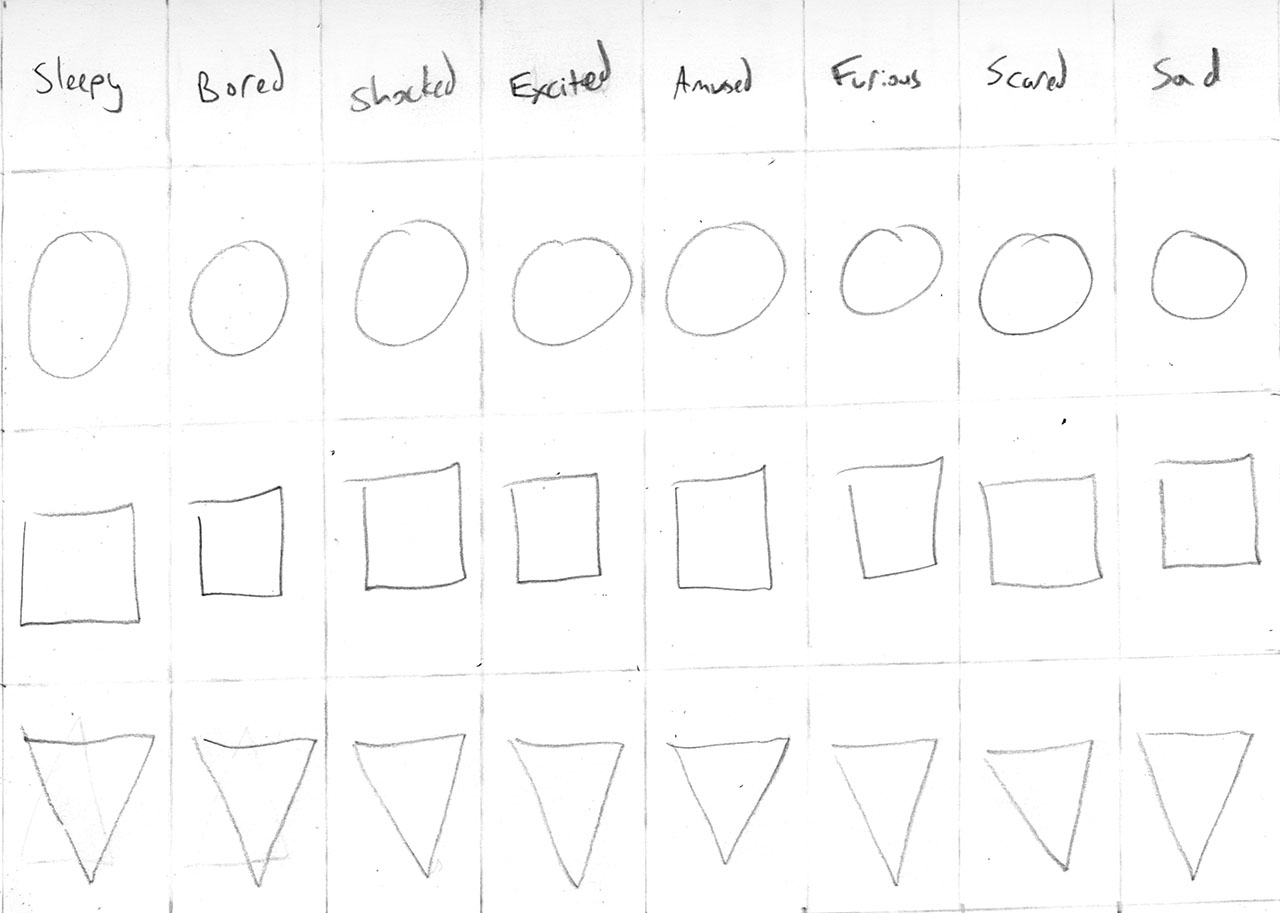
The exercise will last for about 15-20 minutes. Once the drawing time has passed, we will take some time for you to share your drawings with someone sitting close to you. Compare your work, talk about which sketches express the emotions most effectively.
Informal Project 1 In-Progress Critique
Share your preliminary work with other people in the class. This will include your sketches and drawings. If you did any sketching digitally, then you will want to print on the lab laser printer - but most of the work should be in your sketchbook and easily portable. You will be moving around the room and will need to take your sketches with you. This is an opportunity to express both visually and verbally what you are hoping to do with your work for the project. We are in a very early stage of the project and it should be helpful to get feedback as you begin moving forward. To get information from as many people as possible, you will meet one-on-one. Each person will share their project. Then, after a few minutes, you will rotate to meet with another person. The format will be similar to Speed Dating or Elevator Pitches.
Later in the class session, after the demonstration, the professor will work to meet with students individually. At that time you will have the opportunity to get more feedback and comments about your project direction.
Project 1 Demonstration and Work Session
This demo will be a very basic overview of workflow for the project. It can be repeated or adjusted as needed depending on your project.
Sketch -> Trace -> Version -> Refine and Edit -> Finalize and Layout Presentation
- Clear sketches are helpful
- Choose from thumbnails and then redraw and clean up your work
- Work General To Specific
- Point-By-Point or Shape Build
- Simple Colors First
- Save Regularly
- Duplicate Layers/Groups/Etc As Much As Possible
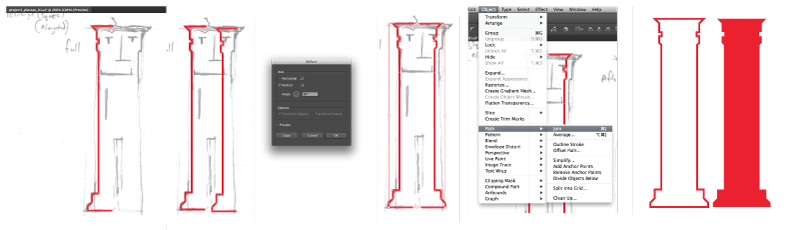
- Symmetry by repeating a path, symmetry can help develop character proportions and unify a design
- Trace with Pen Tool one half of shape
- Copy/Paste that path
- Object -> Transform -> Reflect
- Align as needed
- Direct Select anchor points to be joined
- Object -> Path -> Join
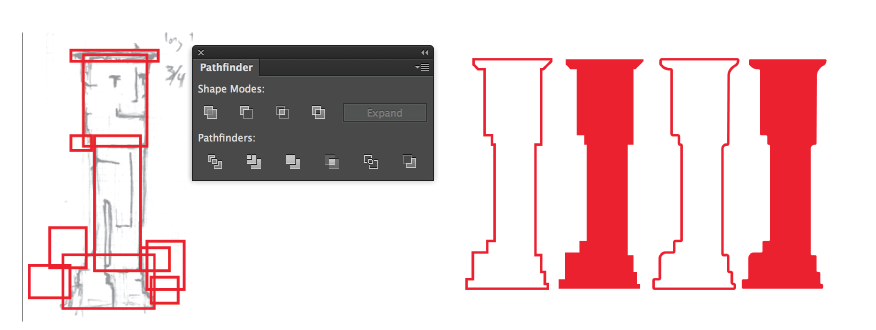
- Use shapes to get generalized or basic form: either point-by-point or shape build
- Pathfinder - Unite and Minus Front (or others as needed)
- Direct Select on corner anchor points - 'rounded corners' handle
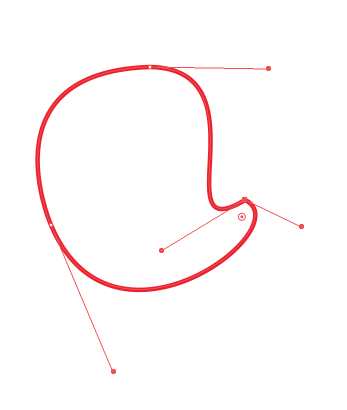
- Convert anchor points
- On anchor eliminates one or more bezier curve handles
- On bezier curve handle allows angle corner with curves
- Direct Select a shape give Smart Curve options
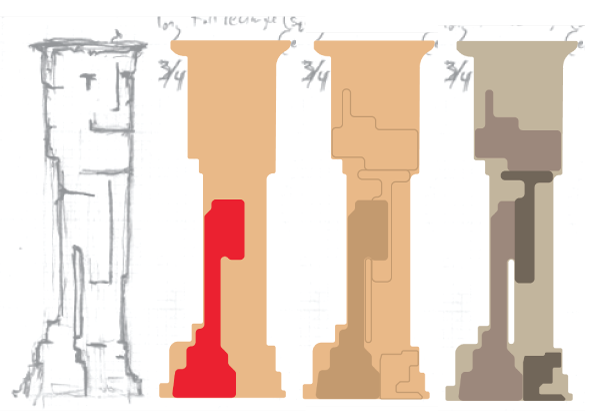
- However you choose to build, work in layers
- Start with base, silhouette, or positive space first - this is a "fill"
- Details like contour line, color, or texture should be built on top
- This could still be considered a sketching stage - to see what happens
- Make alternate versions by duplicating
- Add Layers, Subtract Layers, Reshape Paths in duplicated layers
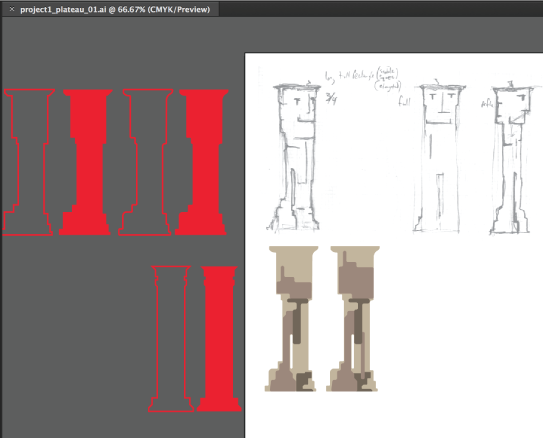
Project 1 Work Session
With the feedback you received earlier in this class sessoin you should have some additional ideas to add to or modify your sketches. Use your studio work time today to begin moving between physical and digital sketching. It is likely that you will build your character multiple times - working with vector graphics to illustrate a concept can also be a lot like sketching in your sketchbook. Remember: you can always copy work into a new work file if you need to isolate and refine something or to move forward after making design decisions for the project.