Class 27 Tues Apr 25
- Project 4 Demonstrations and In-Progress Critique
- Video Screening and Work Session
- Assignments:
- Project 4 Development
- Language of New Media Chapter 6 pp. 309-334
- Discussion Forums Close: Thurs May 4 8pm
- Final Study Pattern App History & Reflection Due May 5
- Announcements:
- Crossman Gallery: BFA and BA Exhibitions
- Theater Department: Animal Farm
- Weekend Movie: Lego Batman
- MeeperBot Internships: contact Professor Herriott
- Solarplate Print Day: Fri April 29 1-4pm CA35
- "Thank you for your participation in a UWW course exploring the use of Study Pattern. To help us learn more about your experience using Study Pattern, please complete this IRB-approved survey (UW-Whitewater IRB Protocol # C16702101Q, Date: 2/28/17) by April 30th, 2017: Survey Link"
- Time Wasters:
In Progress Critique
This critique opportunity will begin with about 30 minutes to open and prepare your work. There will be a short demonstration on exporting/rendering out some of your project for presentation. The rendered videos will be collected in the lab using D2L. Then the work will be screened for discussion.
Project 4 Demonstration - Exporting/Rendering for Preview and Submission
For our Critique and Discussion today you will need to prepare a portion of your project for presentation by rendering the animation as a video. You can preview your work while you are developing it, but sometimes its useful to export a copy of the animation to watch without all of the other interface elements of our software. In addition, you will need to render a final copy of your animation to video for submission. Our process for the critique will mirror our process for final submission of the project in a future class session. This will be quickly covered in Class 27 and will be reviewed during future class sessions as we approach the end of the semester.
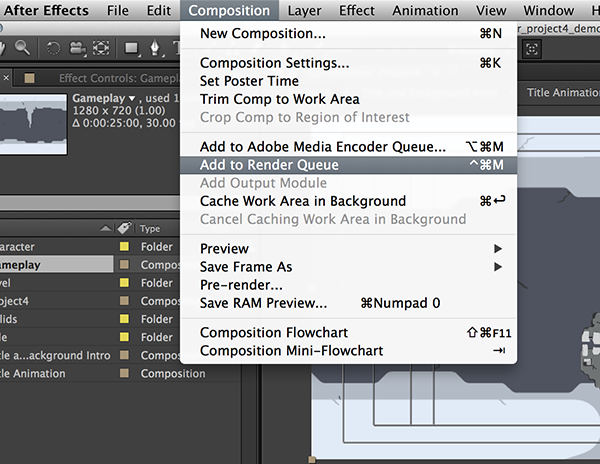
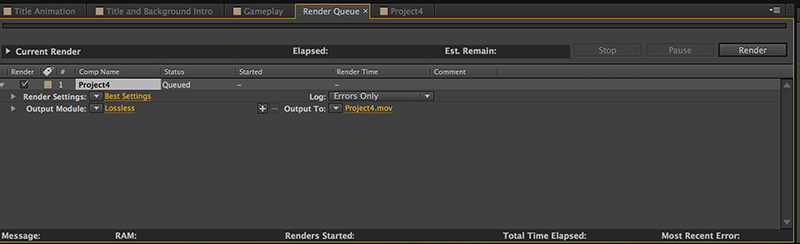
- Composition -> Add To Render Queue
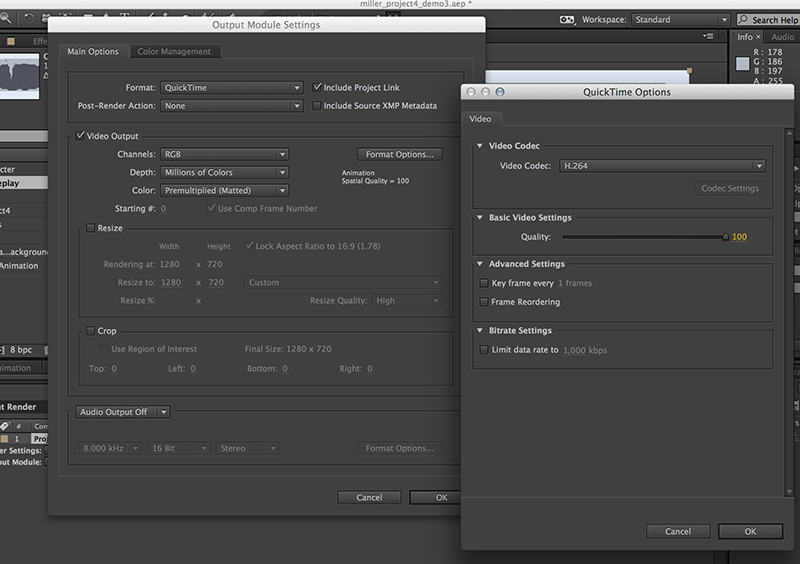
- Change Output Module to Quicktime Movie with Format H264
- Set H264 Quality between 80-90
- Uncheck "Create Project Link"
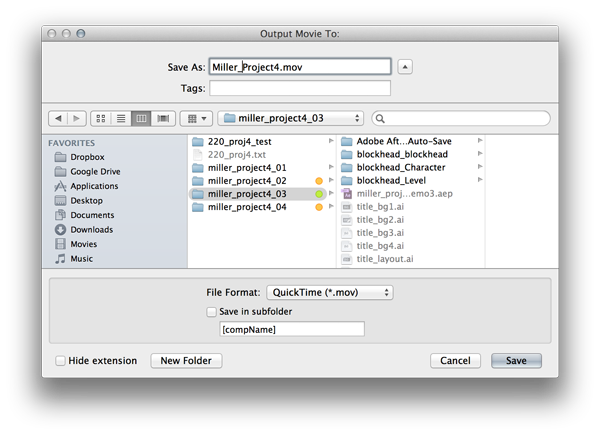
- Update Output To with Filename "Lastname_Project4.mov"
- Start Render
- Render time is determined by amount of layers, total duration of composition, effects, and other project specfiic properties
Project 4 Demonstrations and Work Session
General project development should be organized as follows:
- Title Composition (appx. 5 seconds)
- Assets from Project 3
- Title of Game, Interface Elements, Background
- Layers organized and animated
- could include precompositions for project organization purposes
- Gameplay Composition (appx. 10-15 seconds)
- Assets from Project 1 & Project 2
- Size/Scale 'Environment' elements prior to putting in project
- Animate 'Environment' elements in layers
- 'Character' between layers and animated as necessary
- Final Composition (total 30 seconds or less)
- Title
- Transition
- Gameplay
Project Work Time
Project 3 Work Time will follow our in-progress critique and workflow demonstrations.
Additonal In-Class Demonstrations (Time Permitting):
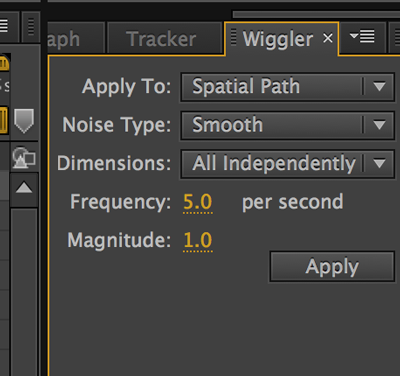
- Wiggler (random action)
- Select Property (Position for Example)
- Window -> Wiggler
- Set Two Keyframes with identical position, then select both
- Apply Wiggler with frequency and magnitude
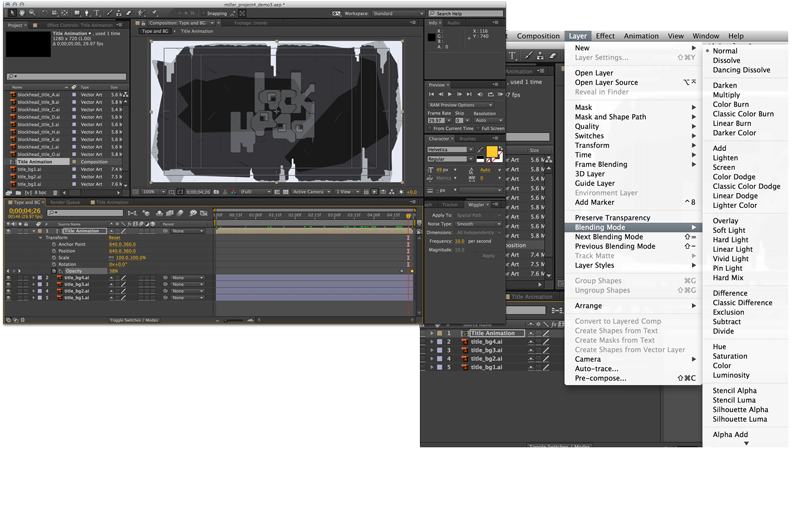
- Opacity and Blend Modes
- Used for 'cross dissolve' appearances
- blend modes to alter how layers interact visually with one another
- additional relationship to compositing strategies
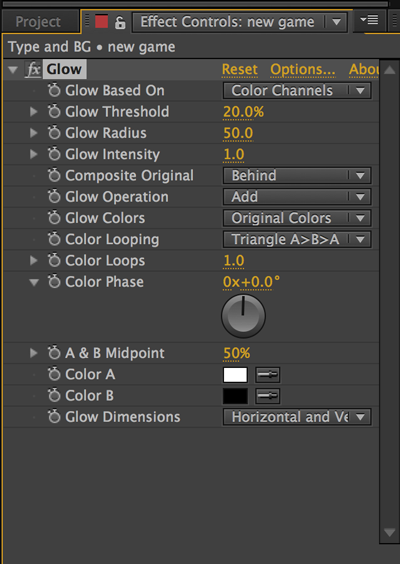
- Effect - Glow
- Can animate on and off (breathing)
- Outer and Inner adjustments
- Effect - Gradient Ramp
- Layer -> New Solid
- Set Start and End Color
- Can animate color shifts over time
- Project 4 Sample Sound Effects
The rest of the class session is yours to begin and continue working on the project. The in-class work time available should be used for working on Project 4. That way we can work together on the project and you can get feedback or suggestions while you are working. There will be plenty of time to work in class on the project, but you may need to continue your work outside of class in order get everything done. In class work sessions are fairly flexible. You are expected to have something to work on during class - anything else would be reflected in your course participation score.